
Over the past few years working with enterprise customers, I’ve seen a major shift in how organizations approach Microsoft Microsoft 365 licensing.
It’s no longer just about email and Office apps — it’s now about AI, automation, security, and intelligent workplace transformation.
In 2026, Microsoft is moving toward an AI-First Enterprise Model, and choosing the right license now directly impacts security posture, productivity, and automation maturity.
So the real question is:
Are you enabling productivity… or building an AI-driven enterprise?
Let’s break it down based on real-world experience and where each license fits best.
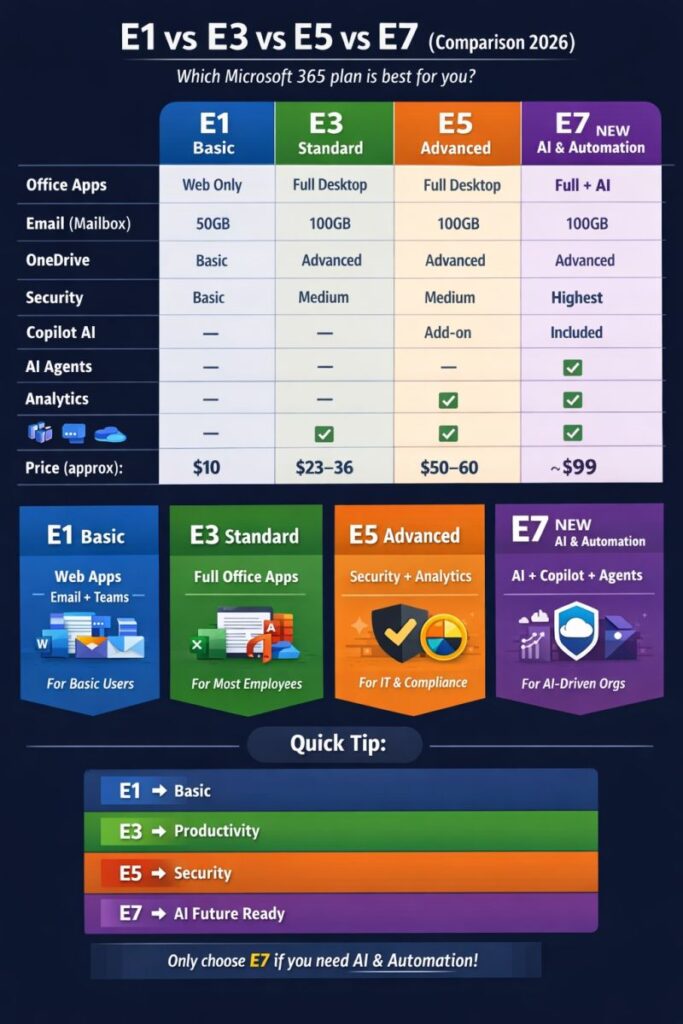
Below table will explain different between based on company requirement you can pick the license
Feature | Microsoft 365 E1 | Microsoft 365 E3 | Microsoft 365 E5 | Microsoft 365 E7 (Releasing 1st May 2026) |
| Overview | Web-based productivity with basic security and compliance | Core productivity with baseline security and compliance | E3 + Advanced Security, Analytics, and Unified Communication | E5 + Microsoft 365 Copilot, Agent 365, Entra Suite, and deeper AI governance with agentic capabilities |
| Core Office Apps | Web & Mobile apps only (Word, Excel, PowerPoint, Outlook, Teams, OneDrive) | Desktop + Web Apps (Word, Excel, PowerPoint, Outlook, OneDrive, Teams) | Same as E3 | Same as E3 |
| Email & Collaboration | Exchange Online Plan 1, SharePoint, Teams | Exchange Online Plan 2, SharePoint, Teams | Same as E3 + Advanced Telephony & Analytics | Same as E5 |
| Security | Basic security features | Baseline security features | Advanced Security + Microsoft Defender XDR, enhanced threat protection | Most advanced stack: Defender, Intune, Purview + Agent 365 Security Governance |
| Compliance | Basic compliance features | Standard compliance features | Advanced compliance and analytics | Advanced Purview + Full AI governance through Agent 365 |
| Identity & Access | Microsoft Entra ID (Basic) | Microsoft Entra ID P1 | Microsoft Entra ID P2 | Microsoft Entra Suite (Expanded identity and governance beyond E5) |
| Device Management | Not included | Microsoft Intune included | Microsoft Intune + Advanced Endpoint Security | Full endpoint + AI-driven device governance |
| Analytics & Insights | Basic reporting | Basic reporting | Power BI Pro included | Work IQ shared intelligence for agentic workflows |
| AI / Copilot | Not included (Add-on available) | Not included (Add-on available) | Not included (Add-on available) | Microsoft 365 Copilot included by default |
| AI / Agents / Automation | Not available | Not available | Limited (Preview-only features) | Agent 365 (Full GA) – Governance and control plane for AI agents |
| Agent Factory / Custom Agent Development | Not Available | Not available | Not available | Optional add-on: Microsoft Agent Factory P3 Plan |
| Best For | Frontline workers / Light users | Enterprise users | Security-focused organizations | AI-first enterprise & automation-driven organizations |
Microsoft 365 E1 Cloud-First Foundation
Best For: Frontline workers, web-only users, contractors
Mindset: “Give me the essentials.”
What You Get
- Web & Mobile Office apps
- Exchange Online (50GB)
- Microsoft Teams
- SharePoint
2026 Update
- Basic Microsoft Copilot capabilities in web apps
My Suggestion
I typically recommend E1 for:
- Frontline workers
- Kiosk devices
- Temporary workforce
- Shared devices
Limitation: No desktop apps, limited security controls
My Suggestion:
Use E1 + Security add-ons if budget is tight.
Microsoft 365 E3 Productivity Standard
Best For: Core workforce and knowledge workers
Mindset: “I need full productivity power.”
What You Get
- Desktop Office apps
- 5TB OneDrive
- Basic DLP
- Windows Enterprise
Value Add
- Microsoft Intune (Plan 1)
- Windows 11 Enterprise
My Suggestion
Most organizations I work with standardize on E3.
Why?
Because it provides:
- Endpoint management
- Compliance baseline
- Productivity tools
My Suggestion:
If you’re starting modern workplace transformation — Start with E3
Microsoft 365 E5 — Security & Analytics Powerhouse
Best For: Security-focused organizations
Mindset: “Protect everything. Analyze everything.”
What You Get
- Power BI Pro
- Teams Phone
- Full Microsoft Defender Suite
- Advanced Compliance
Key Differentiators
- eDiscovery Premium
- Insider Risk Management
- Automated threat remediation
My Real-World Experience
Organizations moving to Zero Trust architecture usually adopt E5.
Especially industries like:
- Finance
- Healthcare
- Government
- Enterprise IT
My Suggestion:
If you’re deploying Conditional Access + Endpoint Security + Zero Trust, go E5
Microsoft 365 E7 — AI-First Frontier (2026)
Best For: AI-Driven Organizations
Mindset: “AI is not a tool — it’s a co-worker.”
What You Get
- Native Microsoft 365 Copilot
- Agent-based automation
- Full Microsoft Entra Suite
Game Changer
Work IQ — Semantic AI graph for intelligent automation
My Suggestion
This is where Microsoft is heading:
- AI-driven workflows
- Autonomous IT operations
- Intelligent compliance
My Suggestion:
If your organization is investing in AI transformation, E7 will become the future standard.
My Real-World Licensing Strategy
Here’s what I usually recommend:
| User Type | Recommended License |
|---|---|
| Frontline Workers | E1 |
| Standard Users | E3 |
| Security-Focused Teams | E5 |
| AI-Driven Organizations | E7 |
My Recommendation
If you’re planning:
- Modern Workplace → Start with E3
- Security Transformation → Move to E5
- AI Transformation → Prepare for E7
Design Diagram to compare the license